Sales Automation: What Should Software Actually Do?
July 13, 2026 · AmplySales Team
Sales automation is not automated spam
Sales automation uses technology to reduce repetitive manual work in the sales process. It may be a deterministic rule that creates a task after a proposal is sent, or an AI assistant that researches a company, summarizes correspondence, and prepares a response draft.
McKinsey's sales automation research estimates that about one-third of sales and sales-operations activities can be automated with existing technology. That does not mean one-third of roles disappear. The research emphasizes human-machine collaboration and identifies lead management, proposal work, administration, and post-sale activity as use cases.
Why do sales teams need it?
Salesforce's 2026 State of Sales research surveyed more than 4,000 sales professionals. It found that:
- the average seller spends about 40% of the workweek selling;
- 48% say they lack bandwidth for adequate cold outreach;
- 51% of sales leaders using AI say disconnected systems slow their AI initiatives;
- 74% of sales professionals are focusing on data cleansing.
The central problem is therefore not only email-writing speed. Sales suffers when data is broken, next actions are missing, or people must copy the same information between systems.
Rules, generative AI, and agents are different
| Mechanism | Good use | Main control |
|---|---|---|
| Rule-based automation | “When a deal reaches X, create task Y” | predefined condition and action |
| Generative AI | research summary, email draft, proposal draft | sources, fact-checking, and approval |
| Agent | reads context and performs several permitted system actions | user permissions, tools, audit, and boundaries |
The greater the effect on customers or business data, the more important confirmation, logging, and reversibility become.
Sales work worth automating
1. Inbound lead handling
- create a CRM record from a website form;
- validate required information;
- assign an owner;
- notify the responsible person;
- prepare the first action.
2. Prospect research and qualification
- collect public company information;
- enrich from registry and web sources;
- calculate an explainable fit score;
- highlight missing or uncertain data;
- avoid creating the same company repeatedly.
3. Follow-up organization
- create a task after an email is sent;
- detect an inactive deal;
- summarize the correspondence;
- prepare a response draft;
- change the planned action when the customer replies.
4. Proposal preparation
- assemble customer, deal, and product context;
- draft the first proposal or sales message;
- identify missing terms;
- route it to a person for review.
5. Closed-won handoff
- create an order or delivery tasks;
- notify the delivery team;
- update related records;
- trigger a webhook where required;
- preserve outcomes and errors.
These categories also match common market packaging. HubSpot lists lead rotation, follow-up, meetings, stage changes, CRM updates, tasks, scoring, and reporting. Pipedrive emphasizes email, tasks, contact data, notifications, and trigger-action workflows. These are vendor product pages, so they establish category conventions rather than independent evidence of impact.
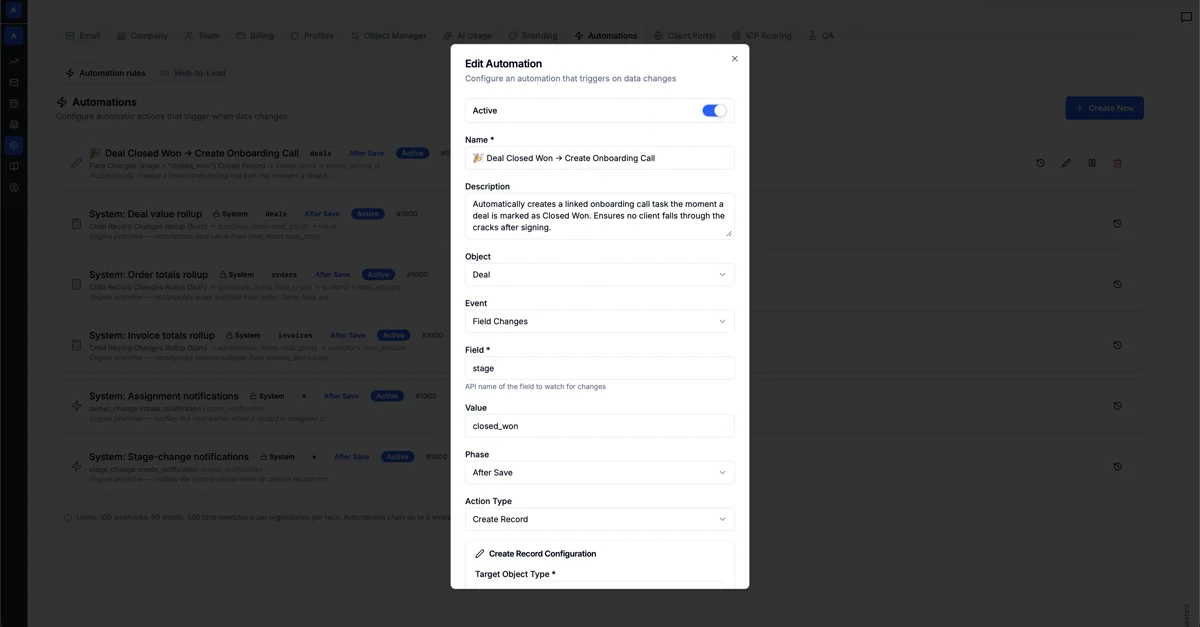
What does AmplySales already support?
The current AmplySales automation engine can start from:
- record creation;
- record update;
- a specific field change;
- a recurring or date-relative schedule;
- a matching inbound email.
An action can update a field, send a compliance-gated email, create a record, update a related record, call a webhook, or run a Managed Agent under a specific user's permissions. Email actions can include tracking, unsubscribe handling, and an explicit follow-up task. Runs are recorded with success or error information.
The engine has honest limits. One automation row performs one action; complex AND/OR conditions, visual branching, and general multi-step orchestration are not yet shipped as a complete user workflow. AmplySales does not provide automatic drip email sequences. A draft, task, or approval-first action is the supported alternative.
Which work should remain human?
Automation should not, without sufficient review:
- promise a price, deadline, or contract term;
- change an important deal state based only on uncertain text interpretation;
- send sensitive or broad-recipient communication;
- mass-delete customer data;
- ignore suppression, opt-out, or permission controls;
- hide why an action ran or failed.
A good division of labor is straightforward: the system gathers context, performs repetitive work, and prepares the decision; a person confirms exceptions, commitments, and high-impact external communication.
How to start without a major project
Choose one repetitive, measurable, low-risk workflow. For example: “Every sent proposal must have a dated follow-up task.” Document:
- the trigger;
- required data;
- the action;
- the owner;
- exceptions;
- the success measure;
- how to pause and repair it.
Then review run history and ask whether manual work fell or follow-up became more consistent. More automations are not a result by themselves.
Related reading: sales pipeline management, configurable business software, and what €10 of AI credit can cover.