How to Choose CRM Software for a Small Sales Team
July 13, 2026 · AmplySales Team
Start with the process, not the feature list
CRM selection becomes confusing because almost every vendor promises contacts, pipelines, reports, automation, and AI. The better question is not “which product has the most features?” It is “what work must our team complete in this system tomorrow?”
Write down one real workflow before watching a demo. For example:
A website lead enters CRM, reaches the right salesperson, receives a first response, becomes a qualified deal, and always has a clear next action.
If a product cannot demonstrate that workflow clearly, a long feature checklist will not rescue it.
1. Does the CRM fit your sales process?
Check whether the system supports the records and relationships you actually use:
- companies and contacts;
- prospects or leads;
- deals, stages, value, and probability;
- products or services;
- emails, tasks, and meetings;
- business-specific data that standard fields do not cover.
An off-the-shelf CRM can be quick to start but expensive when every exception requires a consultant. Fully custom software can match an unusual process, but creates a development and maintenance project. A configurable platform sits between them: the core record and workflow engine exists, while objects, fields, layouts, and actions can be adapted without rebuilding the application.
2. Is email genuinely connected to customer work?
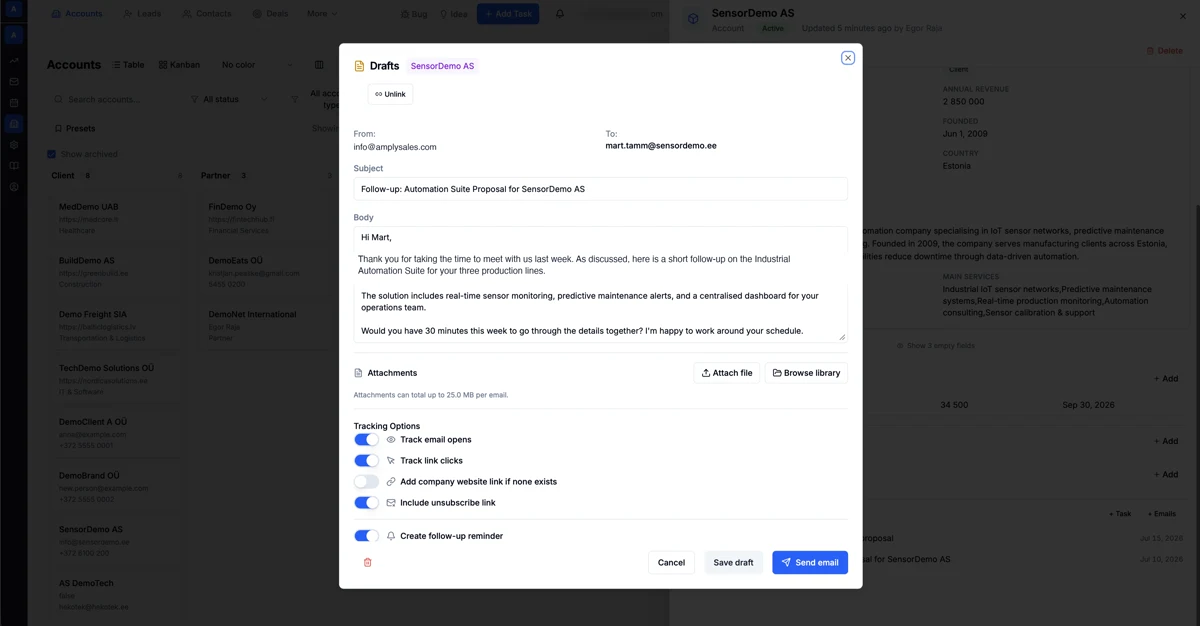
“Email integration” can mean very different things. Ask a vendor to demonstrate concrete behavior:
- sent and received messages attach to the correct CRM record;
- the team can see a customer's interaction history in one place;
- sender signatures, tracking, and unsubscribe controls work;
- a reply can create a task or update work context;
- the system avoids repeatedly contacting suppressed or opted-out people.
IBM's CRM integration overview describes the value of CRM in connected data. Automatic exchange between systems can reduce duplicate entry and help create a more coherent customer view.
3. Does the pipeline show the next action, not only the stage?
A Kanban board is useful, but not sufficient. Every active deal should answer:
- What stage is it in, and why?
- What happens next?
- Who owns it?
- When was the last meaningful interaction?
- What is the deal worth?
- Which information or decision is missing?
If a system lets users drag cards between columns but does not reveal missing next actions, the pipeline can quickly become decorative.
4. How do import, export, and data ownership work?
Walk through the full data lifecycle before buying:
- Which CSV or XLSX files can be imported?
- How are source columns mapped to CRM fields?
- How are duplicates handled?
- Can invalid rows be reviewed before committing the import?
- Can the complete customer and activity history be exported later in a machine-readable form?
- How do deletion, archiving, and retention work?
Data is not only a technical concern. Contact details, correspondence, and user activity may contain personal data. Access, audit, and processing purpose therefore matter alongside convenience.
5. Do permissions work at object, record, and field level?
Not every user needs to read or edit everything. A salesperson may need their own deals, a manager the team's pipeline, and a partner only a limited portal.
NIST defines least privilege as restricting a user, or a process acting on their behalf, to the minimum access needed for the assigned task. In a CRM demo, test three layers:
- object permission: can the user read or edit accounts, deals, or custom objects;
- record permission: can they see their own, their team's, or every record;
- field permission: can a specific role view or edit a sensitive field.
AI assistants must obey the same boundaries. “AI sees everything because it is easier” is not a sound security model.
6. What do automation and AI actually do?
Ask the vendor to show one automated workflow end to end:
- create a new lead;
- assign an owner;
- check or enrich data;
- draft an email;
- create a follow-up task;
- update a deal or related record;
- show the action result and any error.
Separate three capabilities:
| Capability | Best use |
|---|---|
| Rules | deterministic “when X, do Y” work |
| Generative AI | research, summaries, and drafts |
| Agents | multiple permitted system actions under a real user identity |
Always ask which actions run automatically, which require confirmation, and how the result is audited.
7. What is the real total cost?
The monthly license is only one component. Compare:
- licenses and user count;
- usage-based AI or enrichment charges;
- email and external data add-ons;
- import, setup, and training;
- consultant or developer dependency;
- speed and cost of later configuration changes;
- exit cost and data export.
A cheap license can become expensive when every field or workflow change is a paid project. A highly flexible system can also be a poor choice if nobody owns the configuration.
A practical scorecard
Give each candidate 0–2 points.
| Criterion | 0 | 1 | 2 |
|---|---|---|---|
| Real workflow | does not work | needs manual gaps | works end to end |
| Email and history | separate | partly connected | linked and searchable |
| Next actions | absent | manually maintained | systematically visible |
| Configuration | developer only | limited | admin manageable |
| Permissions | too broad | role based | object + record + field |
| Automation audit | absent | basic log | reason, outcome, and errors |
| Data mobility | unclear | partial export | controlled import and export |
| Total cost | unclear | partly known | model and add-ons understood |
The highest score does not decide by itself. A critical weakness in permissions or data export can outweigh several convenience features.
The AmplySales position
AmplySales is designed for small and growing B2B teams that need CRM, email, automation, and AI execution while retaining control over objects, fields, and permissions. It is not a complete accounting or warehouse ERP, and that boundary should remain clear during selection.
Read what CRM is, how a sales pipeline works, and when a B2B company needs CRM, a business platform, or ERP.